


Axisflying SMURFS VTX 5.8G 1.6W Analog image transmission, long range VTX for FPV Freestyle RC Long Range Drone 5/7/10inch
Specifications
| Model | SMURFS VTX |
|---|---|
| Frequency | 5.8G band. 5 frequency groups. 40 transmission frequencies |
| Power Rate | 25 / 100 / 250 / 800 / 1600 mW |
| Antenna Interface | IPEX generation 1 interface |
| Input Power | 7V ~ 36V |
| Adjustment Mode | Button operation. OSD control |
| Product Dimensions | 30 × 30 × 9 mm |
| Product Weight | 12.7 g |
| Mounting Holes | M2 |
| Mount Hole Distance | 20 × 20 mm |
| VTX Protocol | IRC Tramp |
⚠️ WARNING
Be sure to plug in the antenna before powering up. or you will burn this product!
Basic Settings
1. VTX Table Setup
Open the VTX settings.
Click “Load from File” to select and import the corresponding VTX table.
Save the configuration.
2. Port Interface Setup
Go to the Ports tab in Betaflight Configurator.
Enable Peripheral → VTX (IRC Tramp) for the selected UART port.
3. Video Transmission (VTX) Settings
Select frequency Band from the dropdown (A/B/E/F/R).
Select Channel (CH1–CH8).
Select Power Level: 25 / 100 / 250 / 800 / 1600 mW
You can define up to 5 power levels in the VTX table.
Configure Pit Mode and Low Power Disarm as needed.
User's Guide
Frequency Setting
Short press KEY_FR once:
Switches frequency incrementally between CH1–CH8 and saves it.
Frequency Band Setting
-
Long press KEY_FR (between 3–10 seconds):
Enters band setting mode. LED_FR flashes rapidly.Each short press after that: cycles band A → B → E → F → R
LED_FR blinks 1–5 times to indicate the current band
Press KEY_FR again or timeout (>10s) to save and exit.
Power Settings
-
Short press KEY_PW:
Switches power level from level 1 to level 5 (low → high) cyclically.LED_PW blinks 1–5 times to indicate the selected level.
System updates the level but does not save it persistently.
Double-click KEY_PW (<0.5s interval):
Instantly jumps to level 5 (max power). LED_PW stays on.At power-up. the system always defaults to level 1 to avoid damaging the amplifier module.
Long press KEY_PW (>3s):
Disables IRC (serial) communication until reboot.Pit Mode:
Set via Betaflight. LED_PW will blink frequently in Pit Mode.
Restore Factory Settings
Long press LED_FR key for >10s in any mode:
System restores and saves default factory settings.

Axisflying SMURFS VTX. 5.8G 1.6W. blue compact design for FPV systems.

SMURFS VTX: 5.8G. 40 frequencies. 25-1600mW power. IPEX antenna. 7V-36V input. button/OSD control. 30x30x9mm. 12.7g. M2 holes. IRC Tramp protocol. Warning: Plug in antenna before powering up. Basic settings included.
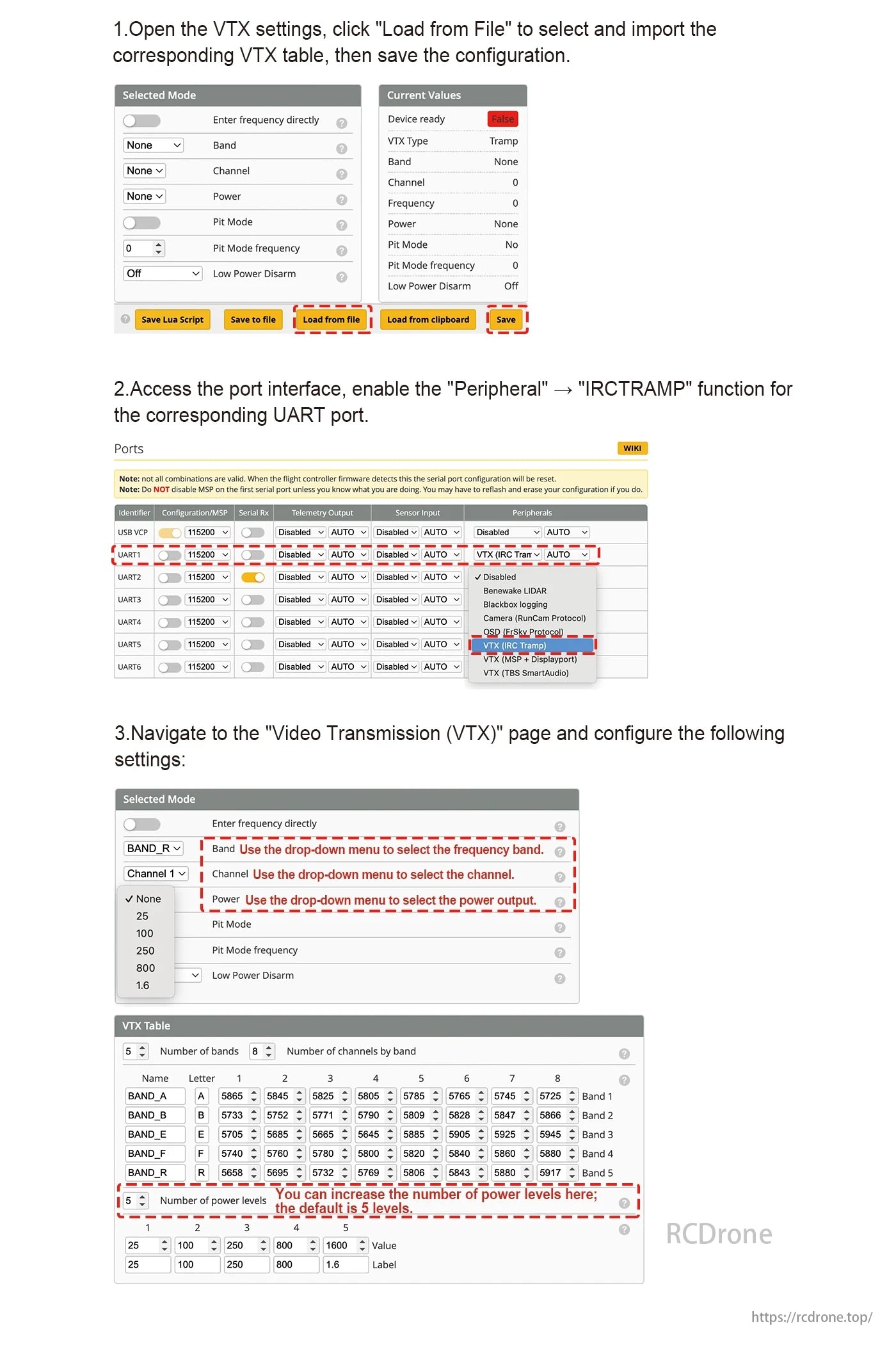
VTX settings: Load file. set UART to IRCTRAMP. choose frequency band. channel. and power. Adjust VTX table for bands and levels if needed. Save config.
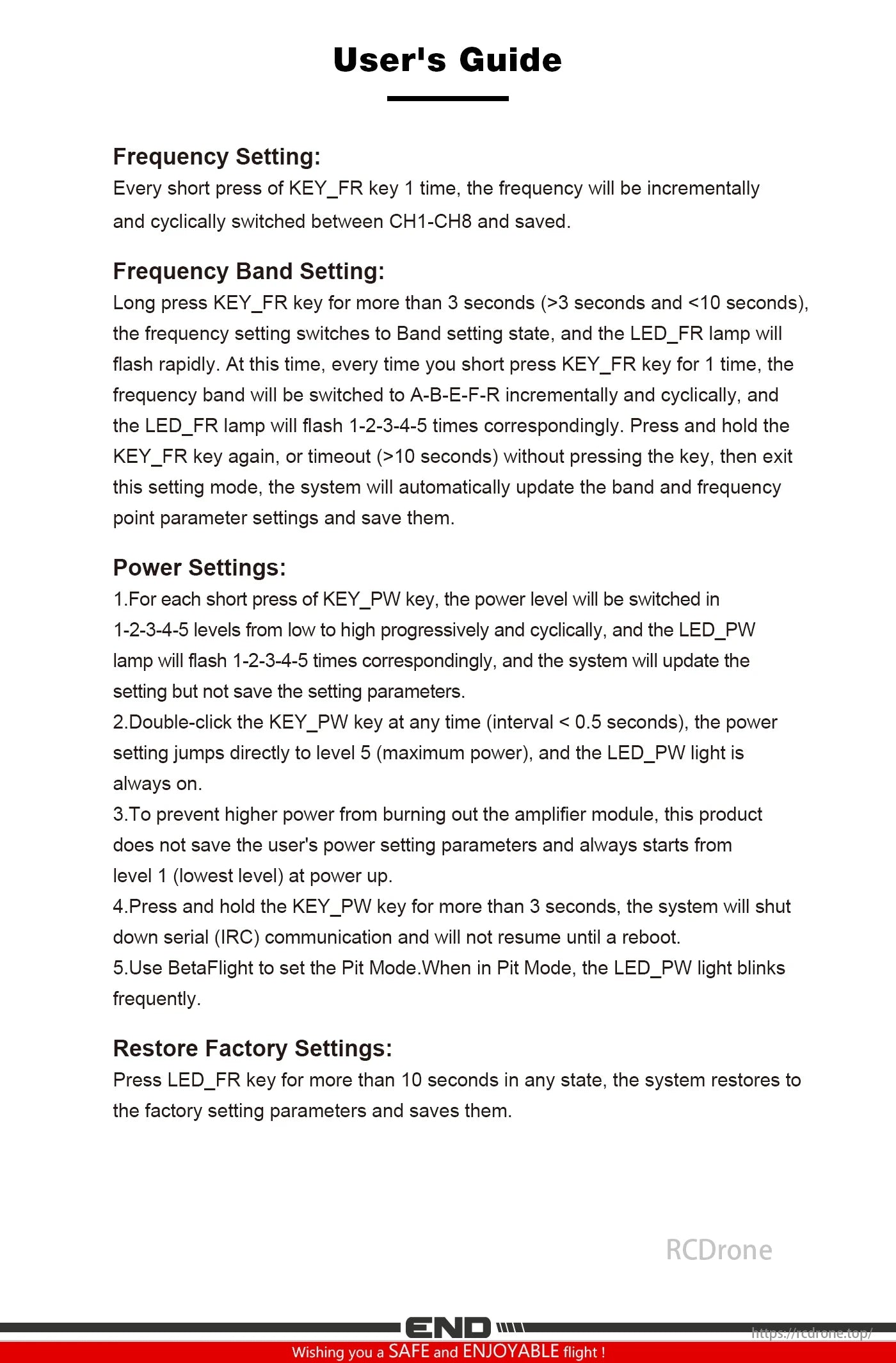
User guide for Axisflying SMURFS VTX: Adjust frequency. band. and power via KEY_FR and KEY_PW. Restore factory settings by pressing LED_FR for 10 seconds. Ensure safe operation with power level limits.
| Default Title |
Default Title |
|---|